Azure Logs
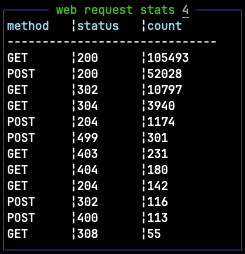
Displays results from an Azure - Log Analytics Workspace query.
Configuration
azurelogs:
  title: web request stats
  enabled: true
  queryFile: "queries/web_stats.yaml"
  position:
    top: 2
    left: 0
    height: 1
    width: 1
  refreshInterval: 30
example query file queries/web_stats.yaml:
azure_subscription_id: 6a258992-8b46-4657-ae2f-1384f2c94af1
azure_workspace_id: 0f244ff4-ddd1-468e-8587-933a54a1ef07
columns: ["method", "status", "count"]
query: |
  AzureDiagnostics
  | where Category == "FrontdoorAccessLog"
  | where TimeGenerated > ago(10m)
  | summarize RequestCount = count() by HTTPMethod = httpMethod_s, StatusCode = httpStatusCode_s
  | top 12 by RequestCount
Screenshots
Attributes
| Name | Value |
|---|---|
title
Title to display above the results |
|
queryFile
Path to file containing the kusto query |
. |
Source Code
https://github.com/wtfutil/wtf/tree/master/modules/azurelogs