Todo
An interactive todo list.
Configuration
todo:
  checkedIcon: "X"
  colors:
    checked: gray
    highlight:
      fore: "black"
      back: "orange"
  enabled: true
  filename: "todo.yml"
  position:
    top: 2
    left: 2
    height: 2
    width: 1
  refreshInterval: 1h
Screenshots
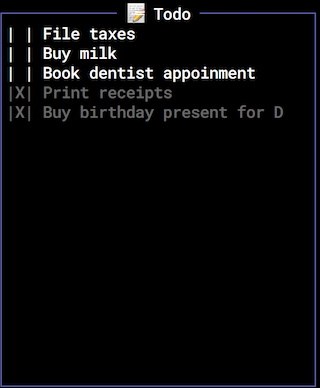
Attributes
| Name | Value |
|---|---|
colors.checked
The foreground color for checked rows. |
Any X11 color name or long-form hex value (i.e.:
#ff0000).
|
colors.highlight.fore
The foreground color for the currently-selected row. |
Any X11 color name. |
colors.highlight.back
The background color for the currently-selected row. |
Any X11 color name. |
colors.tags
The foreground color for tag text. Default: khaki
|
Any X11 color name or long-form hex value (i.e.:
#ff0000).
|
checkedIcon
Optional The icon used to denote a 'checked' todo item. |
Any displayable unicode character. |
checkedPos
Optional The position at which the checkbox is shown. Default: first
|
first, last, none |
dates.enabled
Optional Whether or not the following date functionality is enabled. Default: true
|
true, false |
dates.format
Optional The format in which to display dates. Default: yyyy-mm-dd
|
yyyy-mm-dd, yy-mm-dd, dd-mm-yy, dd-mm-yyyy, dd M yy, dd M yyyy |
dates.hideYearIfCurrent
Optional Hide the year, if the todo item year is the current year. Default: true
|
true, false |
dates.switchToInDays
Optional The number of days in the future after which the todo item date is displayed as an absolute date. Default: 7
|
Any positive integer. |
dates.undatedAsDays
Optional How many days into the future undated todo items should be considered 'due'. Default: 7
|
Any positive integer. |
filename
The name for the todo file. |
Any valid filename, ideally ending in yml. |
newPos
Optional The position into which new todo items are created. Default: first
|
first, last |
tags.enabled
Optional Whether or not to enable the tags feature. Default: true
|
true, false |
tags.hide
Optional A list of tags to hide by default. |
A comma-separated list of tags. |
tags.hiddenInTitle
Optional Whether or not to display in the widget title the number of items currently hidden by tag filtering. Default: true
|
true, false |
tags.pos
Optional The position in the todo item text at which to display tags. Default: end
|
start, end |
Keyboard
| Key | Action |
|---|---|
/ |
Open/close the widget's help modal |
# |
Open the tag-filtering modal dialog |
[esc] |
Remove focus from the selected item |
[esc] |
Close the modal item dialog without saving changes |
[return] |
Edit the selected item |
[return] |
Close the modal item dialog and save changes |
[space] |
Check/uncheck the selected item |
j |
Select the next item in the list |
k |
Select the previous item in the list |
n |
Create a new list item |
o |
Opens the todo list file in whichever text editor is associated with that file type |
r |
Refresh the data |
Ctrl-d |
Delete the selected item |
Ctrl-f |
Move the selected item to the top of the list |
Ctrl-j |
Move the selected item down the list |
Ctrl-k |
Move the selected item up the list |
Ctrl-l |
Move the selected item to the bottom of the list |
Tagging
Todo supports tagging todo list items to provide contextual grouping and filtering.
A tag is a string prefixed by the pound (#) symbol, included somewhere in the todo item text.
Examples:
❯ buy groceries #chore
❯ #chore buy groceries
❯ #this also #works (two tags, #this and #works, text also)
To view only todo items associated with a specific tag, use the # key and enter the tag text in the modal dialog.