Todoist
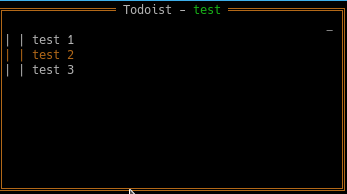
Displays open tasks, by project. A Todoist API token will be needed as well as the project IDs of each project you'd like to browse.
note: One way to get the ID of a Todoist project is to open up the webapp (https://app.todoist.com). Browse a project by clicking on it from the sidebar. You'll see a URL like this: https://app.todoist.com/app/project/<project-name>-<string-id>. That last piece will be the project ID.
Configuration
todoist:
  enabled: true
  apiKey: "p0d13*********************************************c3"
  position:
    top: 0
    left: 2
    height: 1
    width: 1
  projects:
    - d7hhdhudhy7yhd9j
    - dhdh7huhdudh93j8
  refreshInterval: 1h
Screenshots
Attributes
| Name | Value |
|---|---|
apiKey
Your Todoist API key. Leave this blank to use the WTF_TODOIST_TOKEN environment variable.
|
|
projects
An array of Todoist project IDs. |
The string ID of the project. |
Keyboard
| Key | Action |
|---|---|
/ |
Open/close the widget's help modal |
[esc] |
Remove focus from the selected item |
c |
Close current item |
d |
Delete current item |
h |
Show the previous project |
j |
Select the next item in the list |
k |
Select the previous item in the list |
l |
Show the next project |
u |
Clear the current selection |
←
|
Show the previous project |
→
|
Show the next project |
↓ |
Select the next item in the list |
↑ |
Select the previous item in the list |
Source Code
https://github.com/wtfutil/wtf/tree/master/modules/todo_plus